
 By Brian Casel, who makes Cues
Stay with Camtasia if you work on Windows, build training with quizzes and SCORM, or want a deep timeline editor with cursor and callout tools. Pick Cues if you explain things on camera on a Mac and want your own agent to write the story, draw a visual for each cue and edit with you, for $149 a year.
Camtasia edits your recording. Cues plans the video with your agent
Camtasia is a screen recorder and timeline editor for Mac and Windows, made for tutorials and training. You capture your screen, camera and audio, then build the video on a multitrack timeline with callouts, cursor effects and zooms. Its Create plan also writes scripts from a prompt and reads them in an AI voice.
Cues is a Mac app where your agent turns an idea into a story of cues (a hook, the beats and a payoff), writes what you'll say in each one and draws its visual. You present it one cue at a time, then you and your agent finish the edit in the transcript and the timeline.
Your agent inside the app, not a plugin in ChatGPT
Camtasia's AI connection is a plugin inside ChatGPT. You upload screenshots, it drafts a storyboard with a voiceover script and callouts, and the video gets made in Camtasia Online. TechSmith names no connection for Claude Code or Codex, and none into the Camtasia Editor.
In Cues, Claude Code, Codex or any agent works in the app's own terminal with your project open. It writes the outline and script, frames your camera and cuts filler words, and you keep or undo each change. It runs on the plan you already pay for, so Cues adds no extra AI, token or usage cost. See Edit with your agent.
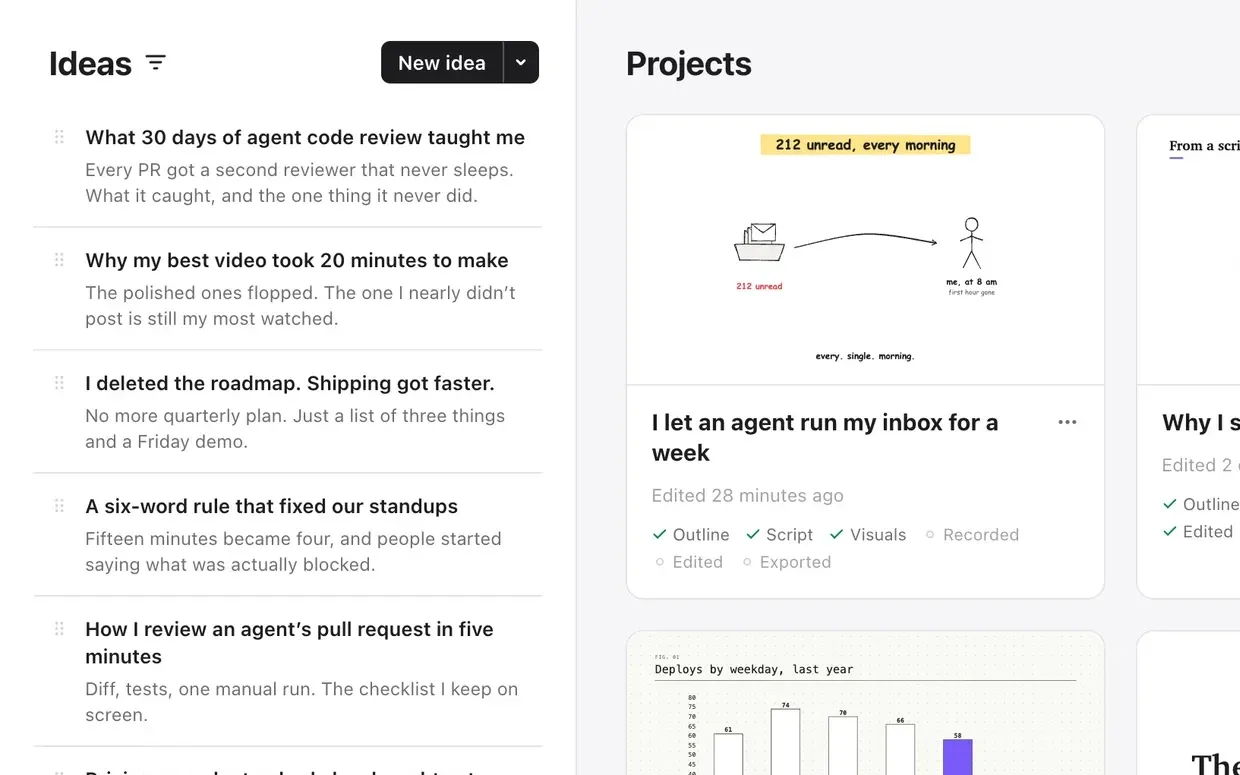
A story and a script before you press record
Before you record, your agent shapes your idea into a story of cues, with what you'll say and a visual for each one. You record from the presenter, which shows the current cue's script with the next cue beside it. See The presenter.
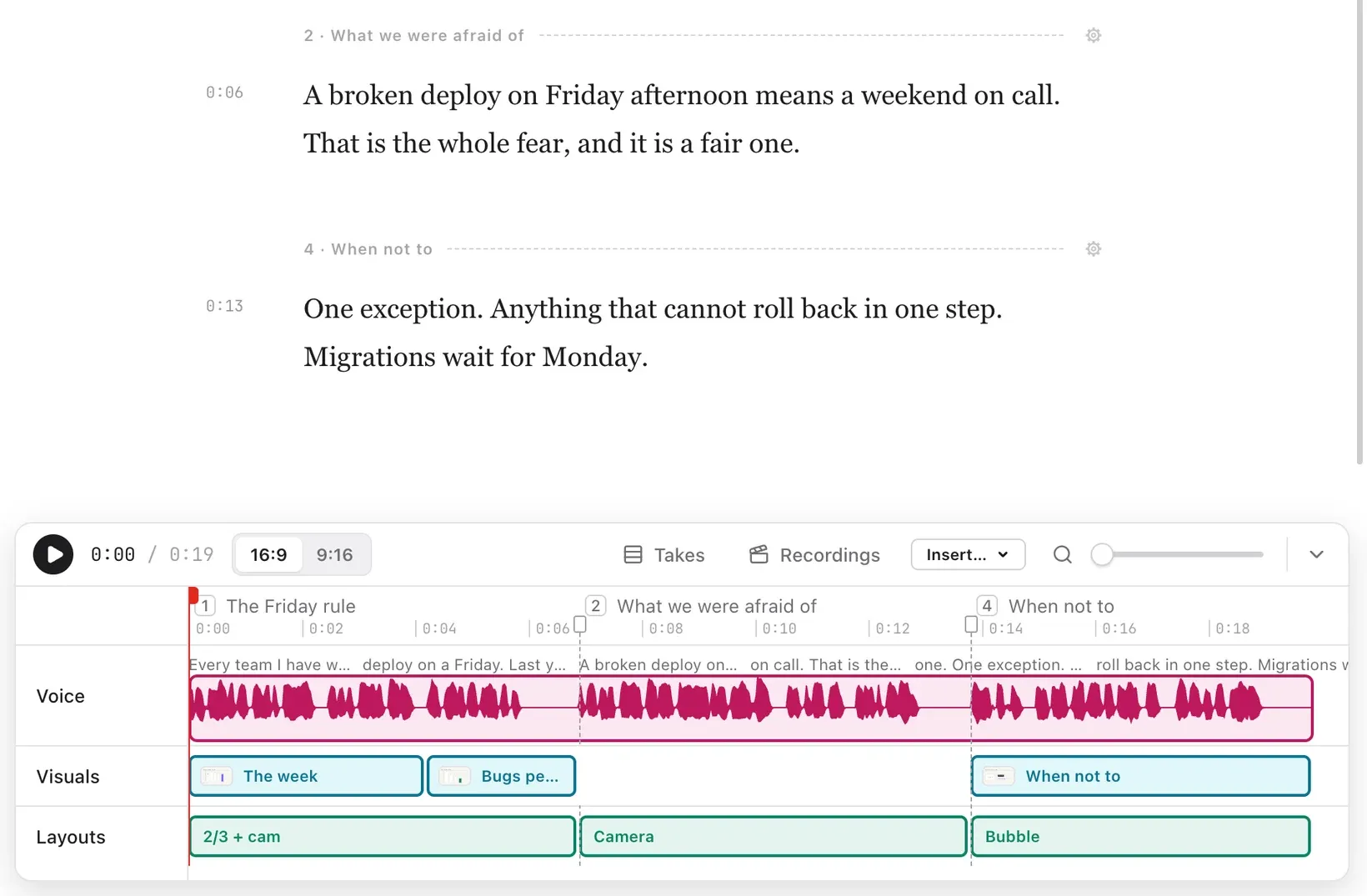
The edit starts while you record
In Camtasia, the edit starts once the recording is in. In Cues, each move to the next cue marks where it starts in the take. When you stop, the take is already laid out cue by cue, each start moved to the nearest pause between words. See Record your video.
You on camera, with a visual for every point
Camtasia Create generates AI voiceovers, and Pro adds AI avatars and dubbing. Cues makes none of those in your place: the video is your face and your voice.
What your agent does draw is a visual for each cue, in your style pack (Sketch, Clean or Blueprint): a diagram, a chart or an animation. See The visual library.
Every cue laid out for each format
Each cue has its own layout in landscape (16:9) and vertical (9:16), so your hook can be full-screen camera in one format and a visual beside you in the other. Export makes one video per format, with captions burned in. See Formats and layouts.
When Camtasia is the better pick
- Windows and older Macs: Camtasia runs on Windows and on earlier versions of macOS. Cues needs macOS 26 or later.
- A deeper timeline for screen tutorials: cursor path editing, callouts, zoom and pan, and PowerPoint import.
- Training for an LMS: quizzes with SCORM export.
- A voice or avatar instead of you: Camtasia can narrate with an AI voice or present with an AI avatar. Cues doesn't.
- A free trial: the Camtasia Editor trial has no time limit, with a watermark on exports. Cues has no trial, only a 14-day money-back guarantee.
If your team has years of Camtasia projects and templates, staying put is reasonable. Shortlisting more than two? See Mac screen recorders compared.
What switching takes
- What you need: a Mac running macOS 26 or later and an agent you already use, such as Claude Code or Codex.
- What comes across: your videos. Export them from Camtasia as MP4, then in the Cues recorder open the takes panel (⌘T) and choose Use a recording file… to add each one as a take. See Use a recording file.
- What doesn't: Camtasia projects, callouts, cursor paths and quizzes.
- What it costs: Cues is $149 a year, with a 14-day money-back guarantee. Camtasia is $179.88 a year for Essentials and $249 for Create, which adds AI scripts and voiceovers.
Side by side
| Feature | Cues | Camtasia |
|---|---|---|
| Best for | Creators and educators who work with a coding agent | Tutorials in a traditional editor |
| Works with your AI agent | Your own agent, built in | ChatGPT plugin (Camtasia Online)1 |
| Records camera and screen | Yes | Yes2 |
| Story outline with a visual per cue | Yes | Storyboard from screenshots (ChatGPT plugin)1 |
| Runs on | Mac, macOS 26 or later | Mac, Windows3 |
| Free plan or trial | No; a 14-day money-back guarantee | Free trial (watermark)4 |
| Price for one person, per year | $149/year | Essentials $179.88; Create $2495 |
- Camtasia Plugin for ChatGPT, checked 2026-11-22
- Camtasia website, checked 2026-11-24
- Camtasia system requirements, checked 2026-11-22
- Camtasia free trial limits, checked 2026-11-22
- Camtasia store, checked 2026-11-24
Which one fits you
- You work on Windows, or on a Mac that can't run macOS 26 or later
- You build training for an LMS, with quizzes and SCORM export
- You want a deep timeline with cursor path editing and callouts, or an AI voice to narrate for you
- You want your agent, such as Claude Code or Codex, inside the app with your project open
- You want the story, script and a visual for each cue ready before you press record
- You want the edit to start while you record
- You want each cue laid out for landscape and vertical, with one export per format
Give your agent your notes, lock an outline of cues, then record your screen and camera from the presenter. Cues is $149 a year, with a 14-day money-back guarantee.
Buy NowQuestions
Can I open my Camtasia projects in Cues?
No. Export your video from Camtasia as an MP4, then add it in Cues with Use a recording file in the recorder's takes panel. Cues transcribes it like any other take. Camtasia edits, callouts and quizzes don't carry over.
Does Camtasia work with Claude Code or Codex?
TechSmith describes a Camtasia plugin inside ChatGPT that turns screenshots into a storyboard and then a video in Camtasia Online. It names no connection for Claude Code or Codex. In Cues, your agent works in the app's own terminal with your project open.
Is Cues cheaper than Camtasia?
Yes, than every Camtasia plan that includes the editor. Cues is $149 a year. Camtasia is $179.88 a year for Essentials, $249 for Create (AI scripts and voiceovers) and $599 for Pro. Camtasia has a 14-day money-back guarantee and a free trial with a watermark; Cues has a 14-day money-back guarantee.
- Camtasia website. Checked .
- Camtasia store. Checked .
- Camtasia free trial limits. Checked .
- Camtasia Plugin for ChatGPT. Checked .
- Camtasia system requirements. Checked .
We make Cues. We check every claim against the competitor's own pages and update this page when they change.